



You created a Facebook group for a real reason. A launch needed a home. A client community needed support. A neighborhood event needed updates in one place. Then the campaign ended, the event passed, or the conversation slowed down until the group became one more asset you had to watch, moderate, and explain.
That's usually when people search for how to delete a facebook group i made. Not because they failed, but because the group finished its job. Closing it well matters. A Facebook group can hold years of posts, member questions, files, photos, and brand history. If you delete it carelessly, you can lose useful material, confuse members, or get stuck in Facebook's admin flow longer than expected.
Table of Contents
- Deciding to Close Your Facebook Group
- Your Pre-Deletion Checklist
- How to Permanently Delete Your Facebook Group
- Alternatives to Deletion Archiving or Transferring Ownership
- Troubleshooting Common Deletion Problems
- What Happens After You Delete a Group
Deciding to Close Your Facebook Group
You open your group and see what many creators eventually face. Posts have slowed down, moderation feels heavier than the value it returns, and the group no longer matches the business, event, or community it was built to support.
That does not mean the group failed.
Some Facebook groups are built for a fixed season. A launch community, a course cohort, a local event group, or a short-term beta program often has a clear end point. Others outlive their original purpose and turn into a maintenance task that keeps pulling attention from channels that matter more now.
The main decision is not just whether to delete it. It is whether the group still has a job to do.
If members still rely on it for answers, networking, or support, deletion may create more frustration than relief. If the conversations have dried up, the offer behind the group has changed, or you are consolidating your audience elsewhere, closing the group can be the cleanest option. I usually advise treating this like retiring an asset, not just removing a tab from your admin menu.
A few practical questions make the call clearer:
- Is the group tied to a completed program, event, or phase of the business?
- Are members still getting real value from the discussions?
- Do other admins agree on closing it?
- Do you need anything inside the group before it is gone?
- Would archiving or transferring ownership solve the problem with less disruption?
Those trade-offs matter because deletion is final. The group disappears as a community space, and anything you failed to save becomes a problem later, not now. That is often the point of deleting, but it should be a conscious choice.
If the group was part of a broader audience-building plan, review that strategy before you shut the door. A Modern Guide to FB Group Marketing is a useful gut check for deciding whether the issue is low relevance, weak community design, or the fact that the group has reached the end of its useful life.
Good group closures are usually quiet, deliberate, and well prepared. Members can tell the difference between an organized wind-down and an abandoned community.
Your Pre-Deletion Checklist
Deleting a Facebook group goes smoother when you do the cleanup first. Many group admins want the button immediately. In practice, the smarter move is to prepare the group like you're winding down a project.
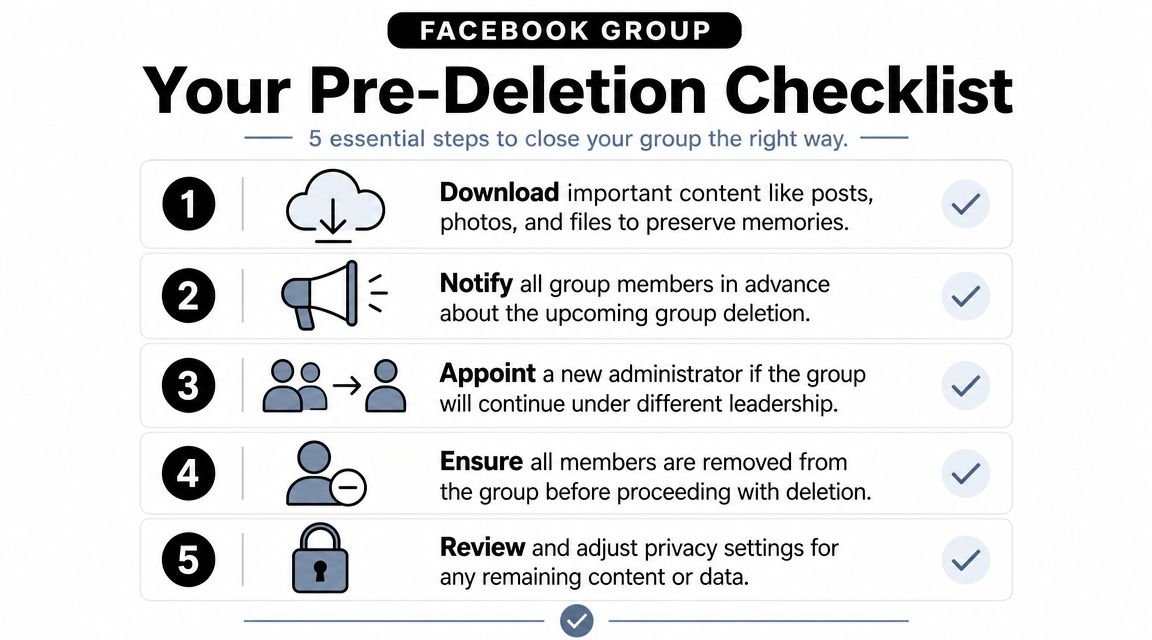

Save what you'll miss later
Start by reviewing posts, files, photos, recurring announcements, and any answers that took real effort to build. Facebook group content often becomes accidental documentation. A group for customers may contain onboarding answers you'll want for a help center. A creator community may contain testimonials, event photos, or discussion prompts worth reusing elsewhere.
Before deleting, pull down anything you can still access and organize it outside Facebook. Use folders with names your future self will understand. “Old group stuff” is not a system.
Tell members what's happening
A short announcement does three jobs. It prevents confusion, reduces support messages, and gives people time to save anything they personally care about.
Keep it direct. Say when the group is closing, why it's closing, and where members should go next if there's a replacement. If there isn't one, say that too. Clear endings are better than vague silence.
Close the group like you'd close a client project. Explain the decision, give a deadline, and leave no ambiguity about what happens next.
Audit admins and moderators
Many deletions get messy at this stage. Check who still has admin access, who has moderator privileges, and whether any old team member is still attached to the group. If your business changed hands, an agency previously managed the page, or a colleague helped launch the group, permissions may not match your assumptions.
If another admin still controls part of the process, deal with that before you start removing members. It's much easier to sort roles while the group is intact than when you're halfway through shutdown.
Expect more manual work in larger groups
One admin discussion noted that for larger groups, each member may need to be removed individually before the admin can remove themself and close the group, which can make deletion difficult at scale, as described in this administrator discussion about deleting a Facebook group. That's the operational reality many simple tutorials skip.
A practical pre-deletion checklist looks like this:
- Download key content: Save posts, photos, files, and recurring resources you may need later.
- Post a closure notice: Give members time to react and ask questions.
- Review the admin structure: Confirm who can approve changes, remove people, or block the process.
- Decide on a replacement destination: Newsletter, website, Discord, email support, or nothing at all.
- Set aside real time: Don't start this five minutes before a meeting. Manual cleanup takes attention.
If you want a clean exit, preparation does most of the work.
How to Permanently Delete Your Facebook Group
You usually reach this point after a decision has already been made. The group is inactive, the brand has changed direction, moderation has become more work than the community returns, or you do not want an old space representing you anymore. Deleting the group is possible, but Facebook only allows it after the group has been cleared down properly.
The rule that matters is simple. A Facebook group cannot be permanently deleted while other members are still inside it. In practice, that means the primary task is not finding a hidden button. It is removing people in the right order, confirming no co-admin can block the process, and leaving as the final admin. Teachable's walkthrough on deleting a Facebook group describes the same underlying logic: once the group is empty and the last admin exits, Facebook completes the deletion flow.
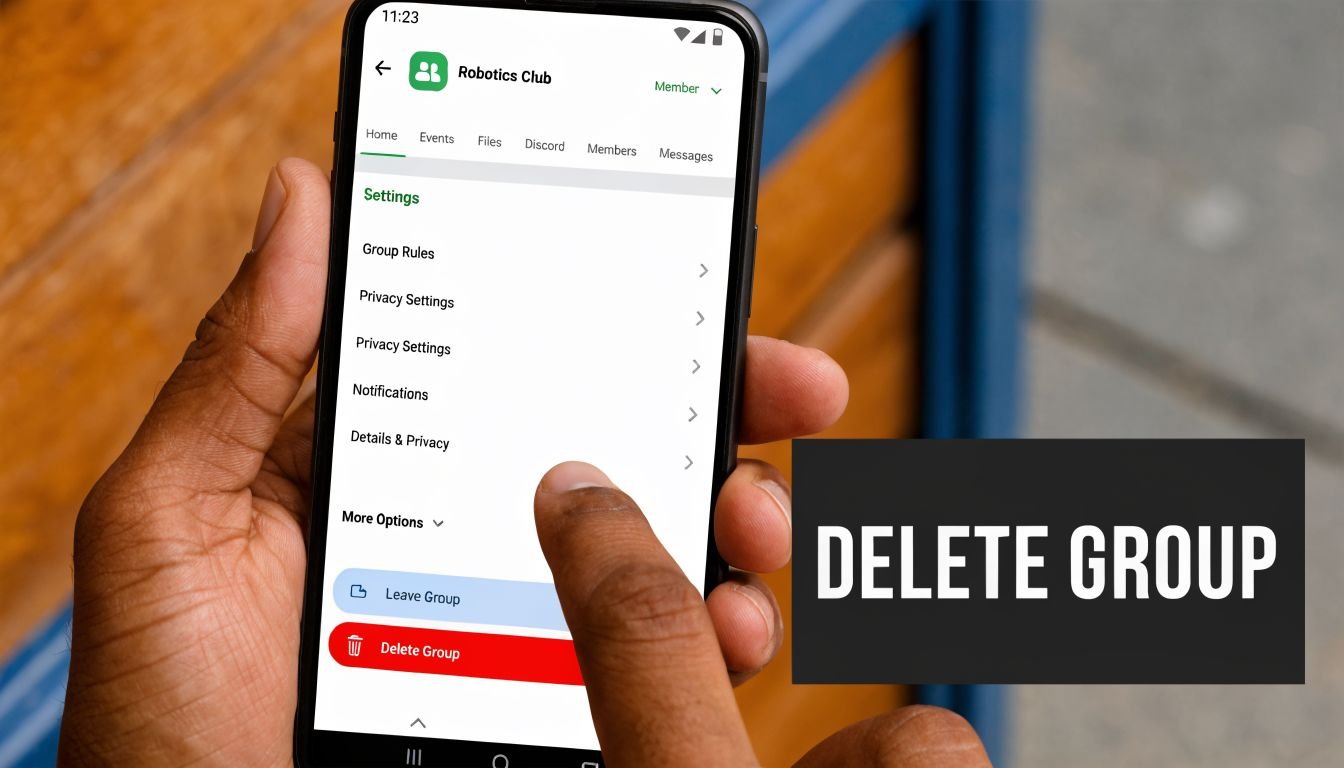

What trips people up is sequence. They open settings first, look for Delete Group, and assume Facebook removed the option. Usually the group still has members, another admin still has control, or the account trying to delete it is not the final admin.
On desktop
Desktop is still the cleanest way to do this, especially if the group has a long member list or shared admin access. The menus are easier to audit, and it is simpler to verify who is still in the group before you take the final step.
Use this order:
- Open the group you created: Go straight to the group, not general Facebook account settings.
- Check the admin and moderator list first: If another admin remains, resolve that before you start the final exit process.
- Remove members individually: Start with regular members, then moderators, then any remaining admins.
- Confirm you are the last person left: The group must be empty for permanent deletion to go through.
- Leave the group yourself: Once you exit as the last admin, Facebook treats that as the final deletion action.
If your real goal is broader account cleanup, not just shutting down one community, this related guide on how to deactivate Facebook in 2026 is useful for deciding whether you need to close the group, reduce your Facebook presence, or leave the platform entirely.
One practical note from client work. If a former employee, freelancer, or agency still has admin access, pause and fix that first. Otherwise, you can end up removing members while someone else still has the ability to change settings, add people back, or delay the shutdown.
On mobile
Mobile can work for small groups. I would not choose it for a messy handoff, a large membership list, or anything involving multiple admins.
The steps are still the same. Open the group, go to admin tools or group settings, remove members, verify that no one else remains, and then leave as the last admin. The labels may differ slightly between iPhone, Android, and app versions, so expect the path to shift a bit even when the logic stays the same.
This short video is helpful if you want to compare the in-app screens before you start:

Why the delete option sometimes seems to disappear
In nearly every case, Facebook has not removed the feature. The group still fails one of the requirements for deletion.
Check these first:
- Members are still present: Even one remaining member can stop the process.
- Another admin still exists: You may need to remove or resolve their role before the option appears.
- You are not the last admin: Facebook will not let the group vanish while admin responsibility still sits with someone else.
- The app view is hiding the path: Try desktop if mobile menus are unclear.
Do not waste time hunting through unrelated account menus. Check the member list and admin list first.
If you need the answer to how to delete a facebook group i made, treat it like a shutdown process, not a single click. The final button matters less than the cleanup before it.
Alternatives to Deletion Archiving or Transferring Ownership
A lot of group owners reach the point where they do not want to keep managing the community, but they also do not want to erase years of posts, answers, and member history. That is usually the moment to pause and choose deliberately. Deletion is permanent. A paused group or a handoff gives you more room to protect the useful parts of the community while stepping out of the admin role.
Facebook treats these as separate actions with different consequences. Deletion ends the group. Pausing a group preserves its history while reducing or stopping new activity. Transferring ownership keeps the group alive under someone else's control. The right choice depends less on the button you can click and more on what you still owe members, co-admins, clients, or your brand.
When archiving makes more sense
Pausing the group is the better option when the content still has reference value and the community does not need active management every day.
That often applies to:
- Course or program groups: Members may still need old lesson threads, files, or FAQs.
- Seasonal communities: Tax, hiring, school, or event groups often go quiet and return later.
- Support libraries: Old troubleshooting posts can still answer common questions.
- Brand communities in transition: You may be moving support to email, Discord, or a help center, but members still need time to adjust.
This path also gives you a cleaner member experience. Instead of making the group disappear overnight, you can post a final announcement, explain what is changing, and leave the archive in place for a defined period. In practice, that reduces confusion and cuts down on the direct messages that usually follow a sudden shutdown.
When transferring ownership is the better move
Transfer ownership when the group still has momentum and the problem is your role, not the group itself.
I usually recommend this when a founder is stepping back, an agency built the group for a client, or a local organizer no longer has time to moderate. The community can keep running, but only if the handoff is intentional. Pick the new admin first. Confirm they want the responsibility. Make sure they understand pending member requests, moderation standards, scheduled content, and any brand or legal boundaries tied to the group.
For reputation-sensitive groups, the decision should include more than admin access. Old posts, complaints, screenshots, and member expectations do not disappear just because leadership changes. If that is part of your concern, Protecting your brand on Facebook is a useful reference point for evaluating what should be cleaned up before a handoff.
How to choose between the three
Use this comparison to decide based on outcome, not impulse:
| Action | Content Status | Member Access | Reversibility | Best For |
|---|---|---|---|---|
| Delete | Removed permanently | Ends when group is gone | Permanent | Finished campaigns, closed communities, outdated brand spaces |
| Archive | Preserved in a paused state | Limited activity, depending on current Facebook behavior | More flexible than deletion | Seasonal groups, resource libraries, temporary breaks |
| Transfer ownership | Preserved under new leadership | Continues under active management | Depends on new admin choices | Active communities you no longer want to run |
A practical rule helps here. If members still need the content, pausing is usually safer than deleting. If members still need the community itself, transfer ownership. If the group creates risk, confusion, or ongoing moderation work with no real upside, deletion is often the cleanest close.
Before you choose, answer three questions: Does this content still help people? Is there someone qualified to run the group after you leave? Are you comfortable with the group existing without your control? Those answers usually make the decision clear.
Troubleshooting Common Deletion Problems
Most tutorials assume a simple setup. One creator. One admin. No old moderators. No inherited permissions. Real groups are rarely that tidy.
Current help content often boils the process down to “remove everyone, then leave as the last admin,” but Facebook's own help language doesn't clearly resolve edge cases around multiple admins or inactive co-admins, which often block deletion, as discussed in this analysis of Facebook group deletion edge cases. That's why people get stuck even after following the standard advice.
If another admin is blocking the process
Start with the admin list, not the member list. If another admin remains, especially someone inactive, your deletion path may not behave the way simple guides suggest.
Use this decision logic:
- If the other admin is active: Ask them to coordinate a closure window with you.
- If the other admin shouldn't still be there: Review whether you can remove or demote them before proceeding.
- If the other admin is a client, former colleague, or agency contact: Resolve ownership first, ideally in writing outside Facebook.
- If you can't control the admin structure: Deletion may need to wait until permissions are fixed.
Many “delete group” attempts fail. The issue isn't the button. The issue is authority.
If the group still won't disappear
Sometimes the member list looks empty, but Facebook still doesn't show the final action clearly. In that case, check for hidden blockers:
- Pending members or requests: Review anything awaiting approval or moderation.
- Roles you forgot about: Moderators and admins count differently from regular members, but they still matter.
- Platform delay: Refresh, re-open the group, or try desktop if you started in the app.
- Cached interface confusion: Log out and back in, or try a different browser session.
If Facebook's flow seems inconsistent, don't keep clicking randomly. Rebuild the checklist from permissions outward.
The practical fix is usually boring. Reconfirm roles. Reconfirm the member list. Reconfirm that you are the final admin. Most deletion problems come from structure, not software drama.
What Happens After You Delete a Group
The part that matters comes after the click. What disappears, what lingers, and what former members can still see.
Facebook's help materials state that group deletion is permanent, but many third-party guides don't explain residual visibility, backup options, or what happens to linked assets like shared Reels or cross-posted content, a gap highlighted in this discussion of post-deletion visibility and data questions. For creators and small businesses, that's often the main issue.
What permanent means in practice
Permanent means you should assume the group itself is gone for you and your members. Don't expect a clean undo. Don't assume you'll be able to reopen it next week because a client changed their mind.
What's less clear from standard tutorials is timing around visibility in the wider ecosystem. A post preview, an old notification, or a reference to shared content may not behave as neatly as the group interface itself. If the group connected to branded content, event promotion, or cross-posted material, review those linked assets before deletion rather than after.
A practical shutdown mindset looks like this:
- Assume loss, not recovery: Save first.
- Audit linked content: Check Reels, events, pinned resources, and external references.
- Expect some lag in surrounding surfaces: Old traces may not vanish in the exact moment you click.
- Document what you removed: Helpful if a teammate or client asks later.
How to guide members somewhere else
The cleanest closure includes a redirect. If members still need updates, support, or content, tell them where to go before the group disappears.
That destination might be:
- An email newsletter: Best for long-term ownership.
- A website or help center: Best for evergreen support.
- Another community platform: Best if conversation still matters.
- A single landing page with all current links: Best if your channels are spread out.
A closing announcement should answer three questions. Why is this group ending? When does it go away? Where should people find you next?
A deleted group shouldn't leave your audience wondering whether you disappeared or simply moved.
Handled well, deletion doesn't just remove a Facebook asset. It clarifies your next channel, protects useful content before it's lost, and closes the loop with members respectfully.
If you're winding down a Facebook group and need one clean place to send people next, Bio Links Page Builder gives you a simple landing page for your newsletter, store, content, contact options, and social profiles so former members still know where to find you.